Running distance without walks in Apple Health
Apple Health lumps walks and runs into one Walking + Running distance. How to see only what you ran, in Health and Fitness, as a monthly or yearly total.
If you have ever asked "how many kilometres did I run this month?" and opened the Health app, you know the feeling. The number is there. It is just wrong.
Why Health mixes walking and running
Apple Health stores distance from your iPhone and Apple Watch as one data type: Walking + Running Distance. The motion sensors cannot always tell a brisk walk from a jog, so Apple made one bucket for both. Every step you take, at any speed, adds to it.
That number is fine for a daily movement goal. It is useless for training. A 40 km running month can show as 110 km once you add the commute, the dog and the supermarket.
What Health does know
Health also stores workouts. When you start a run on your watch, or in Strava, Nike Run Club, Garmin Connect or any app that syncs to Health, it saves a workout of type Running with its own distance, duration and heart rate.
That is the honest number. The trouble is that Health never adds those workouts up for you.
The manual way inside Health and Fitness
- Open the Fitness app and tap Workouts under the Summary tab.
- Filter by Running using the filter button at the top.
- Scroll through the month and add the distances up yourself.
You can also open Health, Browse, Activity, Workouts and scroll the list. Either way you are doing arithmetic on your phone with a pen nearby. Most people do it once and never again.
The easy way
Runtile reads only the Running workouts from Health and adds them up for the week, month or year. That is the whole idea of the app. You see one number, the change against last month, your run count, average pace and streak, and a grid of the year with every run as a tile.
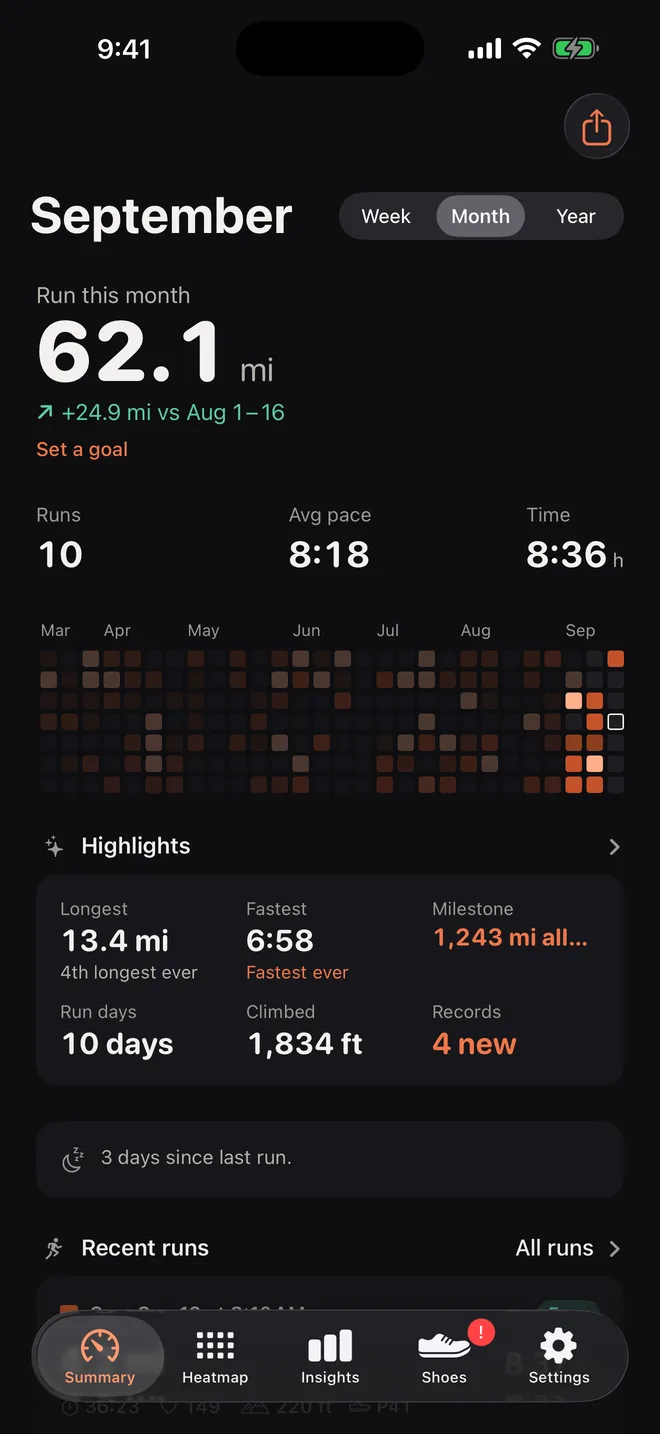
It works with anything that saves runs to Health. Apple Watch does that on its own. For Strava, Garmin, Nike Run Club and others there is a switch in their settings, and we have a guide for each.
Things that trip people up
- Two apps saving the same run. If your watch and Strava both write to Health, the run appears twice. Runtile merges runs that overlap in time. See why the same run shows twice.
- Treadmill runs. They are Running workouts too, flagged as indoor. Runtile includes them and lets you switch them off.
- Runs recorded without a phone or watch app. A run typed into Strava by hand never reaches Health. Only recorded activities sync.
Questions
Can Apple Health show running distance separately?
Not as a total. Health stores one type, Walking + Running Distance. You can open each Running workout one by one in Fitness, but there is no monthly or yearly running only number.
Does Apple Fitness have a running total?
Fitness shows totals per workout type in the Summary trends only for some metrics, and its distance trend mixes workout types. For a running only monthly or yearly total you need a third party app.
Will a third party app change my Health data?
Only if it writes to Health. Runtile is read only, so it cannot change or delete anything in Health.
Related guides
- Training2 min read
Reading a pace heatmap: fast days, easy days and the 80/20 rule
A year of runs as coloured tiles tells you more than any list. How to read the colours, what a healthy pattern looks like, and why most of your tiles should be dark.
- Strava2 min read
How to sync Strava runs to Apple Health
Turn on Send to Health in the Strava iPhone app so your runs appear in Health as workouts. What syncs, what happens to runs from a Garmin, and how to avoid doubles.
- Apple Health1 min read
Duplicate runs in Apple Health: why and how to fix
Two apps wrote the same run, so Health counts it twice. How to find which apps did it, stop it for good, and keep your monthly distance right.