How to see your total running distance on iPhone
Three ways to find how far you have run this month or year on iPhone: the Fitness app, the Health app and a reader app that adds your runs up for you. Plus why the Health number is too big.
"How far did I run this year?" is the simplest question in running, and the iPhone makes it oddly hard to answer. The runs are all there, in Apple Health. Nothing adds them up.
Way one: the Fitness app, run by run
- Open Fitness and tap Summary.
- Tap Show More next to Workouts, or scroll to the workouts list.
- Filter by Running, then add the distances up.
You get an honest number for a week. For a month it is a chore, for a year it is a spreadsheet.
Way two: the Health app, and why its number is wrong
- Open Health, tap Browse, then Activity.
- Tap Walking + Running Distance and switch to the month or year.
That number is too big. Health stores walking and running as one type, so the commute, the dog and the supermarket all count. A 40 km running month can show as 110 km. Health does list your Running workouts under Activity, Workouts, but it never sums them. There is a longer explanation in running only distance in Apple Health.
Way three: a reader app that adds up your runs
A reader app asks Health for read access to workouts, takes only the ones of type Running and adds them up. No recording, no account, nothing leaves the phone.
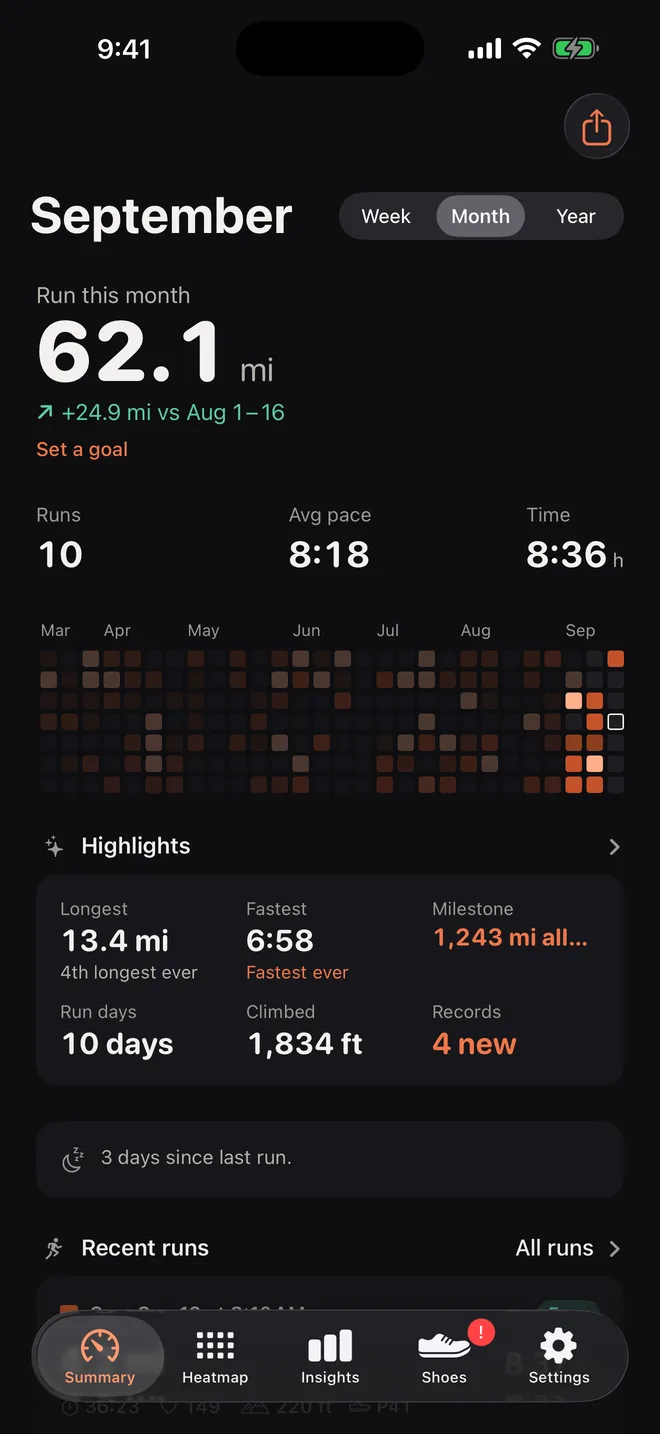
Runtile does exactly this. Open it and the home screen shows how far you ran this month, compared with last month, with the number of runs, time, average pace and streak beside it. Switch to the week or the year with a tap. Set a distance goal and a ring fills as you get closer.
Getting every run counted
- Apple Watch saves runs to Health on its own.
- Strava, Garmin Connect, Nike Run Club, Coros, Polar and Suunto each have a switch to write workouts to Health. There is a guide for each in Guides.
- Treadmill runs are Running workouts flagged as indoor. Runtile counts them and lets you leave them out.
- Runs typed in by hand in Strava never reach Health. Only recorded activities sync.
- The same run from two apps appears twice in Health. Runtile merges runs that overlap in time, so the total stays right. See why the same run shows twice.
Miles or kilometres
Runtile follows the unit set in the Health app, under your profile, Units. Change it there and every total, pace and personal best follows.
Questions
Does the Fitness app show total running distance?
It shows the distance of each run and a distance trend across all workout types. It does not add up your runs for the month or year on their own.
Why is my Health running distance so high?
Health stores Walking + Running Distance as one number, so every walk counts. The real running distance is the sum of your Running workouts, which Health lists but never totals.
Do I need Apple Watch for this?
No. Any app that saves runs to Apple Health works: Strava, Garmin Connect, Nike Run Club, Coros, Polar, Suunto and more. Apple Watch just does it without a setting.
Related guides
- Apple Health2 min read
How to see running only distance in Apple Health
Health adds your walks into one Walking + Running number. Here is why, the manual workaround inside Health and Fitness, and the easy way to get a real running total.
- Strava2 min read
How to sync Strava runs to Apple Health
Turn on the Health connection in the Strava iPhone app so your runs appear in Health as workouts. Plus the one thing Strava does not sync, and what to do if you use a Garmin.
- Apple Health1 min read
Why the same run shows twice in Apple Health
Two apps wrote the same run. Here is how to find which ones, how to stop it, and how Runtile merges duplicates on its own so your totals stay honest.